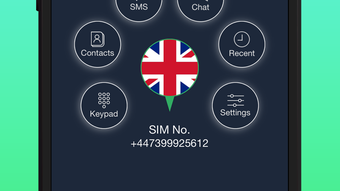

Add Multiple Numbers to One Device
Overview
Vyke Second Phone Number is a desktop application designed to help users manage multiple phone numbers from a single device. The software enables individuals to add up to four distinct numbers, each assignable to different personal or professional purposes. This functionality supports tasks such as maintaining separate communication channels for social media, family, friends, or business interactions. The app operates as a virtual number tool, allowing users to send messages and make calls using these additional numbers, including international communication via VoIP technology.
Target users include professionals managing multiple client relationships, individuals seeking enhanced privacy, and anyone who wishes to compartmentalize digital identities. The software is particularly useful for users who want to reduce the need for multiple physical devices or SIM cards. It supports both Windows and Mac operating systems, offering cross-platform accessibility for users across different environments. Real-world usage scenarios include managing business outreach without exposing a personal number, organizing family communication, or maintaining a separate identity for online social networking.
The developer, Vyke, has positioned this tool as a privacy-focused utility within the communication category. While specific details about the company’s background are not provided, the app’s core functionality centers on digital identity separation and secure messaging. The application does not require a physical SIM card, relying instead on internet connectivity to route calls and messages through its network.
Key Features & Capabilities
- Multi-Number Management – Users can register and manage up to four distinct phone numbers within a single desktop application, each with independent settings and usage patterns.
- Virtual Number Support – Each number functions as a virtual line, enabling users to send texts and make calls without needing a physical SIM card.
- International Communication – The app supports calls and messages to international numbers using VoIP, allowing users to connect globally with minimal cost.
- Platform Integration – Users can sign in via the app or through social media accounts, simplifying access and account management.
- Country Code Selection – The interface allows selection of country codes (e.g., +1 for the USA, +44 for the UK) when adding a new number, ensuring accurate routing.
These features allow users to maintain separate communication identities for different contexts. For example, a freelancer might use one number for client work, another for personal messages, and a third for social media outreach. The virtual number system reduces dependency on multiple physical devices, streamlining digital organization. The ability to add numbers through a simple input process—entering the country code followed by the number—ensures accessibility even for non-technical users.
User Interface, Workflow & Performance
The user interface of Vyke Second Phone Number appears designed for simplicity and intuitive navigation. The layout focuses on core functions such as adding new numbers, managing existing lines, and initiating calls or messages. Menus are likely structured to minimize clutter, prioritizing essential tools. Navigation between different numbers and their respective message histories or call logs is expected to be straightforward, though specific UI details were not provided.
Workflow efficiency is enhanced by the streamlined process of adding a new number: users select a country code, input the number, and complete registration through the app or social media. This reduces friction during setup. The application’s performance is expected to be stable under normal usage, with minimal lag during message sending or call initiation. However, exact performance metrics, including CPU or RAM usage, were not specified by the developer.
Stability and responsiveness are likely maintained through regular updates, though the update frequency is not detailed. The software’s reliance on internet connectivity means performance may vary based on network quality. The developer did not specify resource usage details, so users should expect standard desktop application behavior in terms of background activity.
Compatibility & System Requirements
Vyke Second Phone Number is compatible with both Windows and Mac operating systems, making it accessible to a broad user base across desktop platforms. The software version is listed as 1.0, indicating an initial release with foundational features. The installation size is 125 MB, which is moderate for a desktop application with communication capabilities.
Exact system requirements were not listed by the developer. This includes hardware specifications such as minimum RAM, processor type, or storage space beyond the installation size. Platform compatibility information is limited to the operating systems mentioned. Users should ensure their system meets general desktop software requirements for running applications of this nature. The developer did not provide additional system requirements, so compatibility may depend on standard system configurations.
Pros and Cons
Pros
- Supports up to four virtual phone numbers on one device
- Enables international calls and messaging via VoIP
- Simple number registration with country code input
- Available for both Windows and Mac users
- Free to download and use
Cons
- No information provided about system resource usage
- Exact compatibility details beyond OS are not available
- Reliance on internet connectivity for all functions
- Limited details on security and data protection practices
- Version 1.0 suggests a new product with potential for future updates
FAQ Section
Is Vyke Second Phone Number compatible with my operating system?
The software is designed for Windows and Mac platforms. Users on these systems should be able to install and run the application, though specific hardware requirements were not provided.
Is the software secure to use?
While the app supports private communication through virtual numbers, the developer did not disclose specific security protocols or data encryption methods. Users should exercise caution when sharing sensitive information.
How often are updates released?
Information about update frequency was not included in the available documentation. Users should check the official source for the latest version.
Can I use Vyke without an internet connection?
No. The application requires a stable internet connection to send messages, make calls, and manage virtual numbers. Offline functionality is not supported.
Is the license type free or paid?
Vyke Second Phone Number is currently available as a free tool. No subscription or in-app purchase requirements were mentioned.
Final Thoughts
Vyke Second Phone Number offers a practical solution for users seeking to manage multiple digital identities from a single desktop device. Its ability to support up to four virtual numbers, combined with international communication features, makes it a valuable tool for professionals, privacy-conscious individuals, and those managing multiple online personas. The free pricing model enhances accessibility, while cross-platform support ensures broad usability.
While some technical details remain unspecified, the software’s core functionality is clear and well-targeted. The straightforward setup process and focus on simplicity make it approachable for users of varying technical skill levels. For those looking to streamline their communication workflows and reduce reliance on multiple devices, Vyke presents a compelling option.
Download Vyke Second Phone Number now







